---
title: "JavaScript AJAX requests management abstraction layer"
description: "JavaScript AJAX requests management plugin"
source: https://jsuites.net/docs/v4/core/ajax
---

The `jSuites.ajax` is abstraction layer library to manage JavaScript AJAX requests. It is a vanilla implementation with familiar syntax and few extra useful things on top, such as:

* Familiar syntax: similar to other libraries.
* No dependencies: no external files.
* Queue management: parallel or dependent requests.
* Oncomplete method: multiple requests with on complete request event.
* Data helpers: onbeforesend to overwrite the submittion.


Basic request example
---------------------

```xml
<html>
<script src="https://jsuites.net/v4/jsuites.js"></script>
<link rel="stylesheet" href="https://jsuites.net/v4/jsuites.css" type="text/css" />

<script>
jSuites.ajax({
    url: url,
    method: 'POST',
    dataType: 'json',
    data: { data: JSON.stringify(data) },
    beforeSend: function(xhr) {
        if (token) {
            xhr.setRequestHeader("Authorization", "Bearer " + token);
        }
    },
    success: function(result) {
        // Result
        jSuites.notification(result);
    },
    error: function() {
        alert('disconected');
    }
});
</script>
</html>
```

Before send event
-----------------

Intercept the request and add a authorization bearer to the request.

```xml
<html>
<script src="https://jsuites.net/v4/jsuites.js"></script>
<link rel="stylesheet" href="https://jsuites.net/v4/jsuites.css" type="text/css" />

<script>
jSuites.ajax({
    url: url,
    method: 'POST',
    dataType: 'json',
    data: { data: JSON.stringify(data) },
    beforeSend: function(xhr) {
        if (token) {
            xhr.setRequestHeader("Authorization", "Bearer " + token);
        }
    },
    success: function(result) {
        // Result
        jSuites.notification(result);
    },
    error: function() {
        alert('disconected');
    }
});
</script>
</html>
```

Ajax request queue
------------------

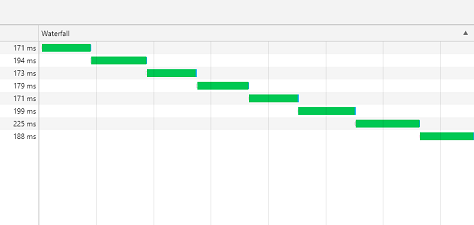
With the property `queue: true` a new ajax request only happens when the previous one is complete.

```xml
<html>
<script src="https://jsuites.net/v4/jsuites.js"></script>
<link rel="stylesheet" href="https://jsuites.net/v4/jsuites.css" type="text/css" />

<script>
for (var i = 0; i < 10; i++) {
    jSuites.ajax({
        url: url,
        method: 'POST',
        dataType: 'json',
        queue: true,
        data: { data: JSON.stringify(data) },
        success: function(result) {
        }
    });
}
</script>
</html>
```

![](/img/ajax-waterfall.png)  

## Multiple requests with oncomplete

The following example will create one call a single event when all requests have been completed.

```xml
<html>
<script src="https://jsuites.net/v4/jsuites.js"></script>
<link rel="stylesheet" href="https://jsuites.net/v4/jsuites.css" type="text/css" />

<script>
var requests = [];
for (var i = 0; i < 10; i++) {
    requests.push({
        url: url,
        method: 'POST',
        dataType: 'json',
        success: function() {
        }
    });
}

jSuites.ajax(requests, function(result) {
    // All requests have been completed
    jSuites.notification(result);
});
</script>
</html>
```